◉
High-Quality Graphics
Clearer fonts and screen parts improve readability. Graphics are designed to remain clear when zooming.

Develop intuitive HMI screens with high-quality graphics, flexible visualization and efficient engineering tools. Create operator interfaces that make machine information easier to understand.
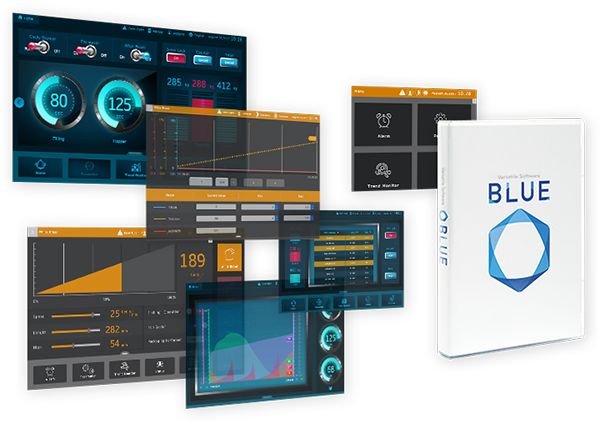
A modern screen creation experience for industrial equipment.
Pro-face BLUE is HMI screen creation software designed to help users create and modify dynamic operator interfaces. Its visual design tools, screen-combination features and reusable design resources support more efficient HMI project development.
Clearer fonts, high-quality graphics and flexible screen presentation help operators access the information they need for machine operation.
Explore Official BLUE Page ↗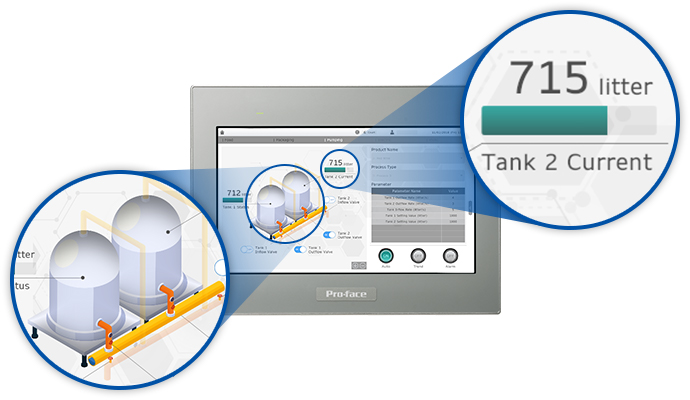
BLUE provides visualization features designed to improve readability and make information easier to access during machine operation.
Clearer fonts and screen parts improve readability. Graphics are designed to remain clear when zooming.
Use refined visual elements and transparent effects to create modern operator interfaces.
Change colour themes for different users or situations and create portrait-oriented screen layouts.
Bring relevant information together so operators can view multiple screen areas in one presentation.
Use flexible graph presentation and supported scrolling gestures to explore displayed information.
Help users reach detailed information through intuitive screen navigation and zoom-based interaction.
BLUE provides an extensive library of preset samples, icons and compound objects to help engineers build and customize HMI screens more efficiently.
Watch the official Pro-face BLUE online training video to learn the basic steps for creating an HMI screen.
Video: BLUE online training — Chapter 1: Quick Start. Published by Pro-face. If the video is unavailable in your region, open it directly on YouTube.
Review the connectivity and security functions available for your target HMI, software version and licence.
Choose from supported device communication drivers and interfaces for your PLC and industrial equipment.
Evaluate documented OPC UA server functions for transferring supported equipment information to host systems.
Web Viewer supports compatible PC, tablet and smartphone viewing configurations, subject to the required licence and target model.
Explore secure remote access for supported HMI systems using Pro-face Connect.
Documented security functions include access controls, automatic logout options and protected project transfer where supported.
Review applicable certification and compliance documentation for your selected hardware, software and application.
BLUE supports selected models within the following product families. Compatibility depends on the exact model and minimum software version.
BLUE support from version 3.1 or later, subject to model requirements.
BLUE 3.1 Service Pack 1B or later, subject to model requirements.
Check individual model restrictions and the supported software version.
BLUE 3.4 or later, subject to supported-model requirements.
Colour models only; monochrome models are not supported by BLUE.
Check the specific supported hardware and runtime licence requirements.
Compare the published build-time and runtime licence references. Confirm the latest ordering details and compatibility with Sciengate before purchasing.
For creating and editing HMI projects with a 12-month subscription.
| Licence | Reference | Seats | Term |
|---|---|---|---|
| BLUE Basic | PFXBLUEBTB1SY | 1 | 12 months |
| BLUE Professional | PFXBLUEBTP1SY | 1 | 12 months |
| BLUE Professional Group | PFXBLUEBTP3SY | 3 | 12 months |
| BLUE Professional Team | PFXBLUEBTP10SY | 10 | 12 months |
| BLUE Professional Entity | PFXBLUEBTP100SY | 100 | 12 months |
Published perpetual build-time licence references.
| Licence | Reference | Seats | Term |
|---|---|---|---|
| BLUE Basic | PFXBLUEBTB1P | 1 | Perpetual |
| BLUE Professional | PFXBLUEBTP1P | 1 | Perpetual |
| BLUE Professional Group | PFXBLUEBTP3P | 3 | Perpetual |
| BLUE Professional Team | PFXBLUEBTP10P | 10 | Perpetual |
| BLUE Professional Entity | PFXBLUEBTP100P | 100 | Perpetual |
| Licence | Reference | Seats | Term |
|---|---|---|---|
| BLUE Runtime | PFXBLUERT1P | 1 | Perpetual |
These references are listed separately on the official licence lineup and should not be confused with the build-time part numbers above.
| Product | Reference | Seats | Supported Hardware |
|---|---|---|---|
| BLUE Professional | PFXBLPCZLSPAZZ | 1 | Selected ST6000, STM6000, GP4100 colour, SP5000, SP5000X, PS6000 and PS5000 models |
| BLUE Professional | PFXBLPCZLGPA31 | 3 | Refer to official lineup |
| BLUE Professional | PFXBLPCZLTPA31 | 10 | Refer to official lineup |
| BLUE Basic | PFXBLECZLSPAZZ | 1 | Selected ST6000, STM6000 and GP4100 colour models |
| BLUE Runtime | PFXBLRCZLSPA31 | 1 | PS6000, PS5000 and PC/AT |
| BLUE Web Viewer Runtime | PFXWRT001A | 1 | Selected supported HMI / PC families |
| BLUE Web Viewer Runtime | PFXWRT010A | 10 | Refer to official lineup |
| BLUE Web Viewer Runtime | PFXWRT100A | 100 | Refer to official lineup |
Access official software installers, manuals, connection guides and learning materials.
Find the official BLUE installer and available trial-mode resources.
Official Downloads ↗Learn basic screen-editing steps and review the BLUE manual.
View Learning Resources ↗Review documented functions, visualization capabilities and software features.
Explore Features ↗BLUE is Pro-face HMI screen creation software for developing operator interfaces on supported hardware. Its capabilities include visualization, screen combination and reusable design resources.
Pro-face advertises more than 650 ready-to-use parts, including samples, icons and compound objects.
The licences have different feature availability and hardware compatibility. The official lineup notes that BLUE Basic does not support Web API or OPC UA. Confirm the requirements of your project before choosing a licence.
BLUE supports documented communication drivers for compatible equipment. Check the official Device/PLC Connection Manual for the exact PLC series, CPU and communication interface.
Web Viewer Runtime and Pro-face Connect support specific remote-viewing or remote-access configurations. Compatibility, licensing and setup requirements apply.
Start with the official BLUE Quick Tour and the Pro-face training video embedded on this page.
Contact Sciengate Automation (M) Sdn Bhd with your target HMI model, PLC and licence requirements to request product guidance and a quotation.
Discuss your Pro-face BLUE licence, compatible HMI hardware and engineering requirements with our team.