Connect Remotely
Access supported machinery from an authorised PC or compatible mobile device through the Pro-face Connect system.

Securely connect to compatible Pro-face HMI systems over the internet with Pro-face Connect.
Support remote troubleshooting, maintenance and access to machinery without treating every remote connection as a separate network project.
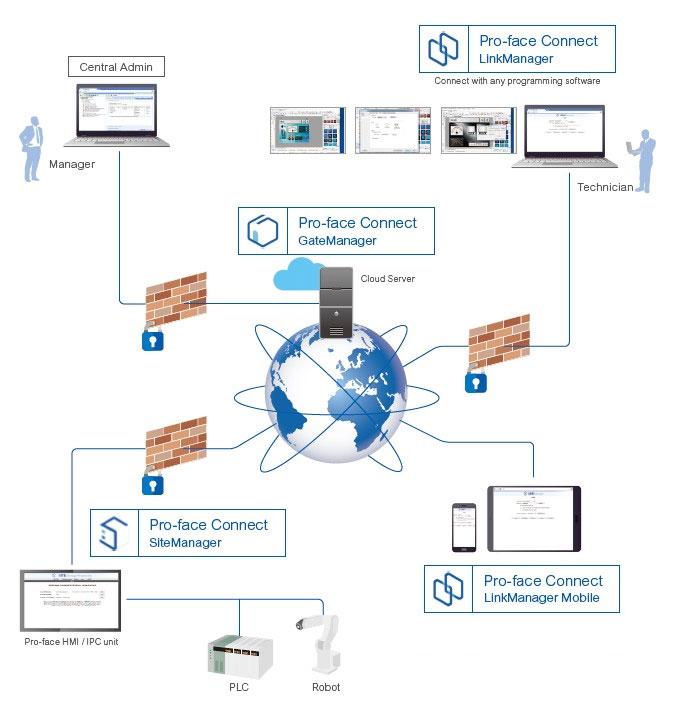
Pro-face Connect is a cloud-based remote access solution designed to connect compatible industrial equipment with authorised users at remote locations. It uses a GateManager, SiteManager and LinkManager architecture.
Access supported machinery from an authorised PC or compatible mobile device through the Pro-face Connect system.
The solution can work with existing local IP addresses, reducing reconfiguration work for supported installations.
Pro-face describes certificate-based user access and AES encryption, with security measures aligned to industrial security standards.
Help engineering and maintenance teams reach compatible equipment without needing to be physically beside every machine.
Support remote diagnosis and maintenance activities where the connected HMI, software and application permit the required operation.
The official solution is designed to avoid individual device network or firewall reconfiguration in supported setups. Confirm requirements with your IT team before deployment.
Use the Pro-face Connect components to manage remote access between supported equipment and authorised users.
Pro-face Connect uses separate components for the machine-side connection, central management and the authorised remote user.
Connects the compatible equipment at the factory site to the Pro-face Connect environment.
Provides the central management environment for authorised users and remote access connections.
Enables an authorised user on a supported computer to establish a connection to the permitted remote equipment.
Remote access to industrial equipment must be controlled carefully. Pro-face Connect documents several security mechanisms for supported configurations.
Security depends on correct setup, account management, software versions, network policies and operational procedures. No remote-access solution removes the need for a site-specific security review.
Evaluate remote access for maintenance and support tasks where your equipment and operating procedures allow it.
Help authorised engineers inspect supported HMI applications remotely and investigate issues before arranging a site visit.
Support maintenance workflows for compatible equipment across multiple factory locations.
Enable approved remote support personnel to access the systems permitted by the configured connection and licence.
Compatibility varies by product series, model, software and version. Always refer to the manufacturer’s current supported-model list.
| Product family | Official compatibility notes |
|---|---|
| ST6000 Series | Listed as supported. Verify the model and required BLUE software version. |
| STM6000 Series | Listed in the supported-model documentation. Confirm the current product status and GP-Pro EX version. |
| SP5000 / SP5000X Series | Specific box and module configurations are listed by Pro-face. Check the exact model number. |
| GP4000 Series | Many models are listed, with exceptions. Verify the official compatibility table before specifying. |
| IPC Series | Selected industrial PC series are listed. Check the supported software, operating environment and SiteManager requirements. |
Pro-face lists trial, Essential and Enterprise packages, as well as individual licence options. Availability and terms should be confirmed with the local supplier.
The official listing describes a 30-day trial package with GateManager, SiteManager Extended for five device agents, LinkManager and LinkManager Mobile licences.
Includes a GateManager customer domain, LinkManager floating licence, LinkManager Mobile licence and an annual SiteManager Extended five-agent licence as listed by Pro-face.
The official package listing includes a GateManager customer domain, LinkManager and LinkManager Mobile licences, 20 SiteManager Extended five-agent licences and GateManager Premium Access.
Before deployment, review the HMI model, software version, network conditions, required user access and licence package.
Pro-face Connect is a cloud-based remote access solution that enables authorised users to connect to compatible industrial equipment over the internet through its SiteManager, GateManager and LinkManager components.
Yes, where the HMI model, software, licence, network and configuration support the intended remote access function. Confirm your specific application against the official compatibility information.
Pro-face describes the ability to connect using an existing local IP address without changing it. Confirm the network architecture and supported configuration for your installation.
Pro-face promotes a setup that does not require individual network or firewall configuration for supported scenarios. Actual deployment must still comply with your organisation’s IT and cybersecurity requirements.
Pro-face lists a 30-day free trial package. Confirm current regional availability, package contents and activation conditions with Sciengate.
Listed families include selected ST6000, STM6000, SP5000, SP5000X, GP4000 and IPC products. Not every model or software combination is supported, so check the official table.
Looking for a practical remote access solution for your Pro-face HMI? Talk to Sciengate about model compatibility, licences and your application.
Enquire Now →Product specifications, compatibility, licence terms and availability are subject to official Pro-face documentation. Verify the selected model and configuration before purchase or deployment. Pro-face is a trademark of its respective owner. This page is prepared by Sciengate Automation Malaysia and is not an official Pro-face website.