Pro-face Data Management Software

Connect Your Factory.
Make Data Work.

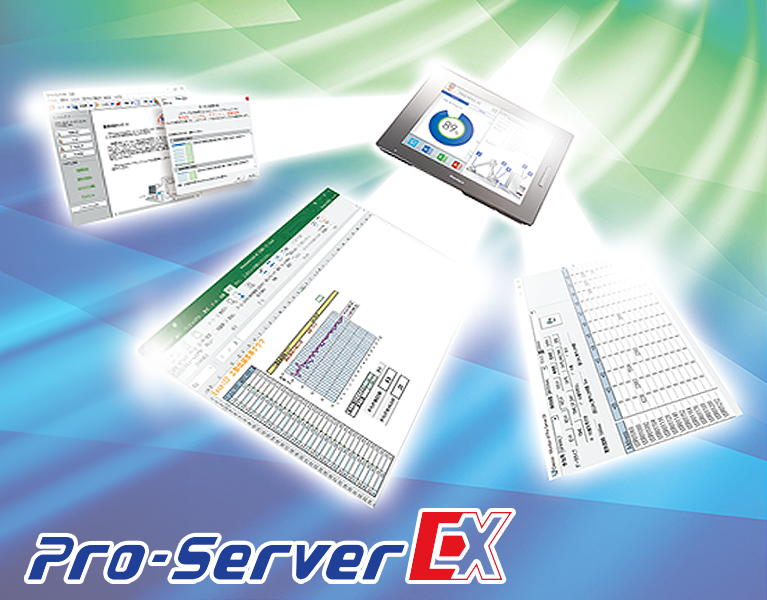
Connect production equipment to office operations with Pro-Server EX. Collect manufacturing data, distribute production instructions and simplify data integration through one connected workflow.

Pro-faces
01 · Easy Collection Collect and use production data
02 · Easy Distribution Share instructions and data
03 · Easy Setting Simplify data integration
About Pro-Server EX

Bring Production Data Closer to Your Business

Pro-Server EX is data management software from Pro-face that helps connect production equipment to office systems through a network. It supports the collection and sharing of equipment data to improve visibility between the factory floor and the office.

By making production information easier to access and use, teams can review operational data, prepare reports and communicate production instructions more effectively.

Discuss Your Application →
Pro-faces
Three Main Features

Three Ways to Connect Your Production Data

Discover the three core feature groups of Pro-Server EX, designed to support data collection, data distribution and easier integration.

01
Collect

Easy Collection

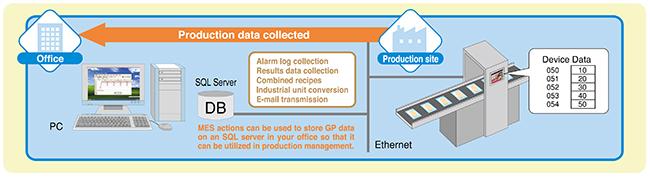
Gather data from PLCs and connected devices to make production information easier to review, analyse and report.

  • Automated data collection from supported devices
  • Visualise production progress using Excel actions
  • Review downtime causes and improvement opportunities
  • Process data and create reports in Excel
02
Distribute

Easy Distribution

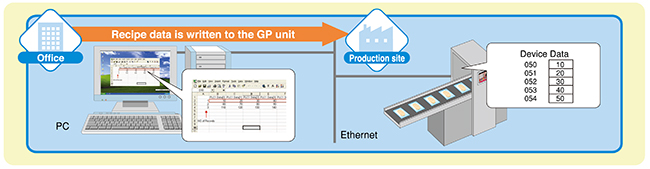
Transfer production-related information from the office to the factory floor and share data between supported connected devices.

  • Transmit operating instructions
  • Send production plans and office-created data
  • Support device-to-device data communication
  • Reduce manual steps in information transfer
03
Integrate

Easy Setting

Use available integration and event functions to connect applications, respond to defined events and simplify supported configuration tasks.

  • API and Action functions
  • Email alerts when configured events occur
  • Import supported Siemens PLC tag information
  • Check model and data-type compatibility before implementation
Factory Data Connectivity

Make Production Information Easier to Use

When production data is easier to collect and share, factory and office teams can work with more consistent information for day-to-day operations.

  • Access collected data from supported production devices.
  • Use Excel to organise information and prepare reports.
  • Transfer production instructions and plans to the factory floor.
  • Connect supported applications and configure event notifications.

Available functions depend on the connected devices, software configuration, supported models and applicable compatibility requirements.

Pro-faces
How It Fits Together

From Equipment Data to Production Action

A simple overview of how Pro-Server EX can support data exchange between connected production equipment and office operations.

01. Collect

Acquire data from supported PLCs and connected equipment.

02. Use & Share

Review data, prepare reports and distribute production information.

03. Integrate

Use supported functions to connect applications and respond to configured events.

Frequently Asked Questions

Pro-Server EX FAQs

Essential information to help you understand the software and its application.

What is Pro-Server EX?

Pro-Server EX is Pro-face data management software that connects supported production equipment with office operations over a network for data collection and sharing.

What are the three main features?

The three main feature groups on the official Pro-face feature page are Easy Collection, Easy Distribution and Easy Setting.

Can Pro-Server EX work with PLCs?

Pro-Server EX supports data collection and communication with compatible devices. Actual compatibility depends on the PLC model, connected equipment, drivers and configuration.

Can production data be used in Excel?

The official feature description includes Excel-related functions for visualising production progress, processing collected data and preparing reports.

How can I check if Pro-Server EX suits my application?

Share your existing HMI, PLC models, data requirements and intended workflow with Sciengate Automation. Our team can help you identify the relevant compatibility and application requirements.

Talk to Sciengate Automation

Looking to Connect Your Factory Data?

Discuss your production data collection, data distribution and integration requirements with our team.

Enquire About Pro-Server EX →

Sciengate Automation (M) Sdn Bhd · Industrial Automation Solutions