
SP5000 Series

With increasingly sophisticated machine performance; production management and predictive maintenance utilizing operation data; and the growing popularity of the cloud, big data is coming to the manufacturing shop floor.
Pro-face has realized unprecedented connectivity in the new SMART PORTAL, creating a new interface designed firmly with the future in mind.The SP5000 series allows a huge variety of data to be downloaded to SMART PORTAL and transmitted in an optimal format to those who need it.
SMART PORTAL connects information and people for optimal communication
Specification| Premium Display | Advanced Display | Open Box | Power Box |
|---|---|---|---|
| High performance display supports multi-touch operation and provides brightness sensor and auto-scaling. | The wide-screen display can display a large amount of information. | Able to run Windows applications practicably at tough environments. (equipped with HMI Runtime as standard) | Solid box achieves high-speed processing and fast display. |
| SP-5700TP, SP-5660TP, SP-5600TP, SP-5500TP | SP-5600WA, SP-5500WA, SP-5400WA | SP-5B40 | SP-5B10 |
| Specifications about Display Module | Specifications about Box Module | ||
EZ Series
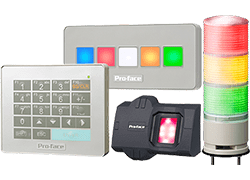 EZ Fingerprint Recognition Unit involves fingerprint technology. In some jurisdictions, this product may be subject to notification to and/or approval by relevant local regulatory authority prior to importing this product into such jurisdictions and/or using this product in such jurisdictions. The jurisdictions which do not require such notification and/or approval as of July 1, 2013 (“Non-regulated Jurisdictions”) are as follows:
Japan, Korea, Taiwan, Thailand, Singapore, Australia, USA, Canada, Mexico, Brazil
In any other jurisdictions, we strongly suggest importers and users to contact the local authority and make inquiries as to notification and/or approval requirements with respect to the imports and the use of this product. Furthermore, if you intend to incorporate this product into any machine, device or application, additional regulations may apply. We also encourage importers and users in the Non-regulated Jurisdictions to confirm the latest notification and/or approval requirements with the local authority as relevant regulations may change from time to time.
It is your responsibility to comply with laws that regulate this product. We will not be liable for any claims or litigation arising from the imports or the use of this product in any jurisdiction. You will indemnify us from any claims or litigation arising from the imports or the use of this product.
Specification
EZ Fingerprint Recognition Unit involves fingerprint technology. In some jurisdictions, this product may be subject to notification to and/or approval by relevant local regulatory authority prior to importing this product into such jurisdictions and/or using this product in such jurisdictions. The jurisdictions which do not require such notification and/or approval as of July 1, 2013 (“Non-regulated Jurisdictions”) are as follows:
Japan, Korea, Taiwan, Thailand, Singapore, Australia, USA, Canada, Mexico, Brazil
In any other jurisdictions, we strongly suggest importers and users to contact the local authority and make inquiries as to notification and/or approval requirements with respect to the imports and the use of this product. Furthermore, if you intend to incorporate this product into any machine, device or application, additional regulations may apply. We also encourage importers and users in the Non-regulated Jurisdictions to confirm the latest notification and/or approval requirements with the local authority as relevant regulations may change from time to time.
It is your responsibility to comply with laws that regulate this product. We will not be liable for any claims or litigation arising from the imports or the use of this product in any jurisdiction. You will indemnify us from any claims or litigation arising from the imports or the use of this product.
Specification
GP-Pro EX

A Premier HMI Development Software that supports Dedicated and Open HMI (PC-based) solutions. GP-Pro EX is compatible with data in the past and has lots of functions that reduce development time.
Specification| Interface Basic Features – Connectivity – Wide Range of Control Equipment – Use Video for On-Site Adjustments – Ethernet Multi-Link function – Easily Connect Multiple USB Devices – Indicate Status for Each Line – Boost System Performance – Smooth Alarm Analysis – Easier to Change a Recipe – Alarm History Banner Display – Output of Sampling Data in CSV – Historical Trend Graphs – Manage Operation Log Data – Configure Detailed Security Settings – Change Security Settings – Remote Monitoring in Real-time – Pro-Server EX – GP-Viewer EX – Camera-Viewer EX – Web Server – RPA (Remote PC Access) | Easy Screen Creation – Leverage Existing Assets – Project Converter – Resolution Converter – Batch Part Converter – Create similar screens – Sharing Images and Parts – Quickly Understand Detailed Differences – Multi-version File Format Support – SRAM Data Retention – Download Sample Parts – Indirect Device Setting – Anyone Can Design Realistic Screens – User Original Start Screen – Realistic 3D parts – Add Movement with Animation – Display Numerical Data in Style – Image Fonts to Expand Design – Display/Hide Parts Saves Time – Word Data Range Setting on Lamp Display – Sampling in Different Device Formats – Utilize Siemens PLC’s tag – Easier-to-understand Icon Design – Parts Toolbox – Headers/Footers for Immediate Access – Text Search/Replace Function – Direct Alarm Message Input – Searching/Sorting Alarm – Relieves PLC Memory Burden – GP-Pro EX Simulation |
GP-Viewer EX

Pro-face software products include HMI application creation, acquisition of a range of device information, and remote control and monitoring. In addition, software suitable for your application such as SCADA software that can be used for analysis of quality-related data is available.
Specification| PC | Windows PC/AT compatible machine | |
|---|---|---|
| Operating System | Windows XP 32bit OS (Service Pack 2 or later, any edition) Windows Server 2003 32bit OS (Service Pack 2 or later, any edition) Windows Vista 32bit OS (Service Pack 2 or later, any edition) Windows 7 32bit/64bit OS (Service Pack 1 or later, any edition) Windows 8.0 32bit/64bit OS (any Service Pack, Core/Pro/Enterprise Edition) Windows 8.1 32bit/64bit OS (any Service Pack, Core/Pro/Enterprise Edition) Windows 10 32bit/64bit OS (any edition) | |
| Language | Display Language of Software Menu | English, Japanese |
| Language that can be displayed on GP-Viewer EX | ASCII supported languages, Japanese, Korean, Chinese (Traditional), Chinese (Simplified), Russian (Cyrillic) and Thai. | |
| Hard Disk Space | 150 MB or more (this amount of free space is required for the installation) | |
| Memory | 【Windows XP/Vista/7/8.0/8.1/10】 1 GB or more (2 GB or more is recommended) 【Other Windows XP/Vista/7/8.0/8.1/10】 256 MB or more (512 MB or more is recommended) | |
| Mouse | Required. | |
| Requirements equipment | CD/DVD drive: Use during installation. LAN port: Required for LAN connections. | |
| limitations on operating environment ,and notes | TCP/IP protocol required. Resolution: 1024 x 768 or higher. | |
| Recommended environment | 【Windows XP/Vista/7/8.0/8.1/10】 CPU : Pentium 4 (1.5GHz) or higher Memory: 1GB or greater 【Other Windows XP/Vista/7/8.0/8.1/10】 CPU : Pentium 4 (1.5GHz) or higher Memory: 512MB or greater | |
Pro-face Remote HMI
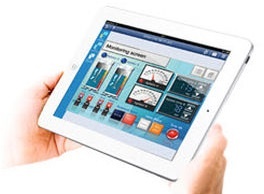 The Pro-face Remote HMI supports synchronous and asynchronous operation modes which switch during operation.
A new parameter in the GP-Pro EX setting provides the option to limit the operation modes for the Pro-face Remote HMI. Specification
- Monitoring Anywhere of Large/Long Equipment.
- Save time with remote troubleshooting
- Efficiently and effectively monitor machines on the factory floor
- Wireless Andon System
- Multi-client Function
- Streamline processes and improve operation
- Mobilize your existing control system